Ludo Darts Rules
The classic race board game, played with darts: your dart picks the die, and the first player with all their pieces home wins.
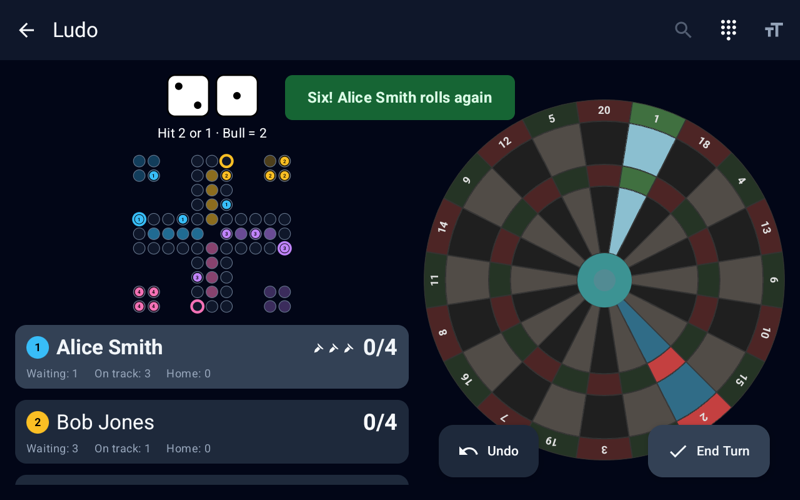
Overview
Ludo is the classic race board game, also known as Mensch ärgere Dich nicht, played with darts instead of a die. Every player races their pieces once around the board into their own goal row and knocks opponents back to the start on the way.
Every roll shows two dice, and your darts decide which one counts. The first player to bring all their pieces home wins; in a single-leg game, the others play on for the remaining places.
Game Setup
| Setting | Value |
|---|---|
| Players | 2 to 6 |
| Pieces | 1, 2, 3, or 4 per player (default 4) |
| Colors | Every player picks a different color |
| Board | A cross with 40 track fields for 2 to 4 players, a hexagon with 60 track fields for 5 or 6 players |
| Format | Single leg or best of N legs |
| Darts per Roll | Up to 3 |
Rolling with Darts
At the start of every roll, Dartly rolls two dice and highlights their numbers on the dartboard. The two dice always show two different numbers, so every roll offers a choice between two values. Your darts pick the die:
- Hit a number: the first dart that hits the segment of either number decides the roll. Single, double, and triple count alike, and the rest of the darts are not thrown.
- Bull: the outer bull and the bullseye take the higher die.
- Any other segment or a miss: decides nothing, and the next dart follows.
- Three darts without a hit: the roll takes one of the two dice at random.
Moving Pieces
- Move: the roll moves one piece that many fields forward. Pieces jump over any other piece, but may not end on a field held by one of your own pieces.
- Entering: a six brings a waiting piece onto your start field. While pieces are waiting, a six must enter one, and a piece on your start field must move on as soon as it can.
- Capturing: end your move on an opponent's piece and it goes back to its waiting fields. Capturing is not mandatory.
- Goal row: a piece enters its own goal row by exact count and cannot move past the last field. No piece enters another player's goal row.
- Choosing a piece: when the roll leaves one legal move, it is made at once. With several, tap one of the highlighted pieces on the board; with none, the roll is lost.
Extra Rolls
- Six: a six gives you another roll after the move, unless it brings your last piece home.
- Three attempts: when none of your pieces can move, you get up to three rolls to throw a six, each with two new dice.
Winning
- All pieces home: a player finishes when every piece stands in their goal row.
- Single leg: the first player to finish wins, and the others play on for the remaining places.
- Legs: in a multi-leg match, the first player to finish wins the leg, and the first player to win the required number of legs wins the match.
Game Flow Example
The dice show 6 and 3. Three of your pieces are waiting, and your start field is free:
| Dart | Throw | Result |
|---|---|---|
| 1 | Single 1 | Neither number; the next dart follows |
| 2 | Triple 6 | Hits the 6: the roll is a six |
| 3 | — | Not thrown |
The six brings a waiting piece onto your start field, and you roll again. Had the second and third darts missed both numbers too, the roll would have taken the 6 or the 3 at random.
Statistics
Dartly tracks every player's games and wins, the win rate, darts thrown, rolls, sixes, the hit rate (the share of rolls a dart decided), captures, pieces lost, the most captures in a game, and the average finish position.
Confirmation Mode
Confirmation Mode is an optional setting you can turn on when creating a game, or toggle mid-game from the top bar. Tapping the dartboard opens a magnified 1.5× overlay showing the segment you hit, its two neighbors, and the Bull — tap the correct segment to confirm the throw, or tap outside the overlay to cancel with nothing recorded. It's especially useful in Ludo, where the 6 sits between the 13 and the 10, so one wrong segment can cost you the six you need. Misses are always registered immediately and skip the confirmation step.
Strategy Tips
- Go for the six: when either die shows a six, aim for it — it enters a piece or moves furthest, and it gives you another roll.
- Read the board first: before you throw, check which of the two numbers captures an opponent or carries your piece out of reach.
- The Bull takes the higher die: when the bigger number sits on an awkward segment, the Bull gets it too.
- Mind the goal row: pieces enter by exact count, so near home aim for the number that fits.
Related Games
Related Articles
Play Ludo Now
Pick your colors, choose 1 to 4 pieces, and race them home. No download needed for the web version.
Play Now